Case Study: Secure Authentication for AI Agents Running Scheduled Tasks

Case Study: Secure Authentication for AI Agents Running Scheduled Tasks (Fullstack AI Guide)
AI agents that schedule and execute tasks hours or days later introduce a non-obvious problem: authentication breaks over time.
If your agent schedules a task for tomorrow, but your access token expires in 1 hour, the execution will fail unless you design the system correctly.
In this case study, I'll walk through a production-ready approach to authentication for AI agents running delayed and recurring tasks - based on real-world constraints you will hit in fullstack AI systems.
The Problem: Time vs Token Expiry
Modern systems rely on short-lived access tokens.
Typical setup:
- Access token TTL: 1 hour
- Refresh token TTL: days, weeks or even months
Now introduce AI agents:
- "Remind me to follow up with this lead in 3 days"
- "Send a report every Monday"
Your agent now needs to act long after the original token expires.
Naive approach (fails)
- Store access token → expires → task fails
- Re-authenticate user → not possible in background
Real requirement
You need:
- Long-lived authorization
- Scoped permissions
- Secure storage
- Automatic token refresh
The Core Solution: Refresh Token Based Authentication
The correct approach is:
Store a refresh token securely and use it to mint a new access token at execution time.
High-level flow
-
User authenticates
-
You receive:
- Access token
- Refresh token
-
You store the refresh token securely
-
Scheduled task runs later
-
System uses refresh token → requests new access token
-
Task executes with fresh credentials
Why Refresh Tokens Are Critical for AI Agents
Without refresh tokens:
- Your agent is limited to short-lived actions
- Background automation becomes unreliable
- You introduce manual friction (re-login)
With refresh tokens:
- Tasks can run days or weeks later
- Agents become truly autonomous
- UX becomes seamless
This is the foundation for:
- AI assistants
- CRM automation
- Outreach agents
- Workflow engines
Security Architecture for Refresh Tokens
Refresh tokens are high-value secrets.
If leaked:
- Attacker can mint new access tokens indefinitely
- Full account takeover risk
So the real problem becomes:
How do we store refresh tokens securely for later use?
Why Database Encryption Is Not Enough
A common mistake is relying on:
- Disk encryption
- Managed DB encryption (RDS, Atlas, etc.)
This is not sufficient.
Why?
Because:
- DB admins or compromised services can still read plaintext values
- Application bugs can expose tokens
- Insider threats remain possible
Required Approach: Application-Level Encryption
You must encrypt refresh tokens before storing them in the database.
Key idea
- Encrypt in your application layer
- Store only encrypted values in DB
- Decrypt only at execution time
Secure Token Storage Architecture
Step 1 - Encrypt before storage
const encryptedToken = encrypt(refreshToken, dataKey);
store(encryptedToken);
Step 2 - Store encryption keys safely
Options:
- KMS (recommended)
- Environment secret (simpler, less secure)
Best practice:
-
Use envelope encryption:
- Data key encrypts token
- Master key (KMS) encrypts data key
Step 3 - Decrypt only when needed
const decryptedToken = decrypt(encryptedToken, dataKey);
Use it immediately to refresh the access token, then discard it from memory.
Why Application Encryption Matters
Application-level encryption protects against:
- Database leaks
- Misconfigured backups
- Internal access misuse
- Partial system compromise
Even if your DB is exposed:
- Tokens remain unreadable
- Attacker cannot act on behalf of users
End-to-End Secure Authentication Flow (Production Ready)
Here is a full flow you can implement.
Diagram 1 - Capture and Store Credentials

Diagram 2 - Execute Scheduled Task

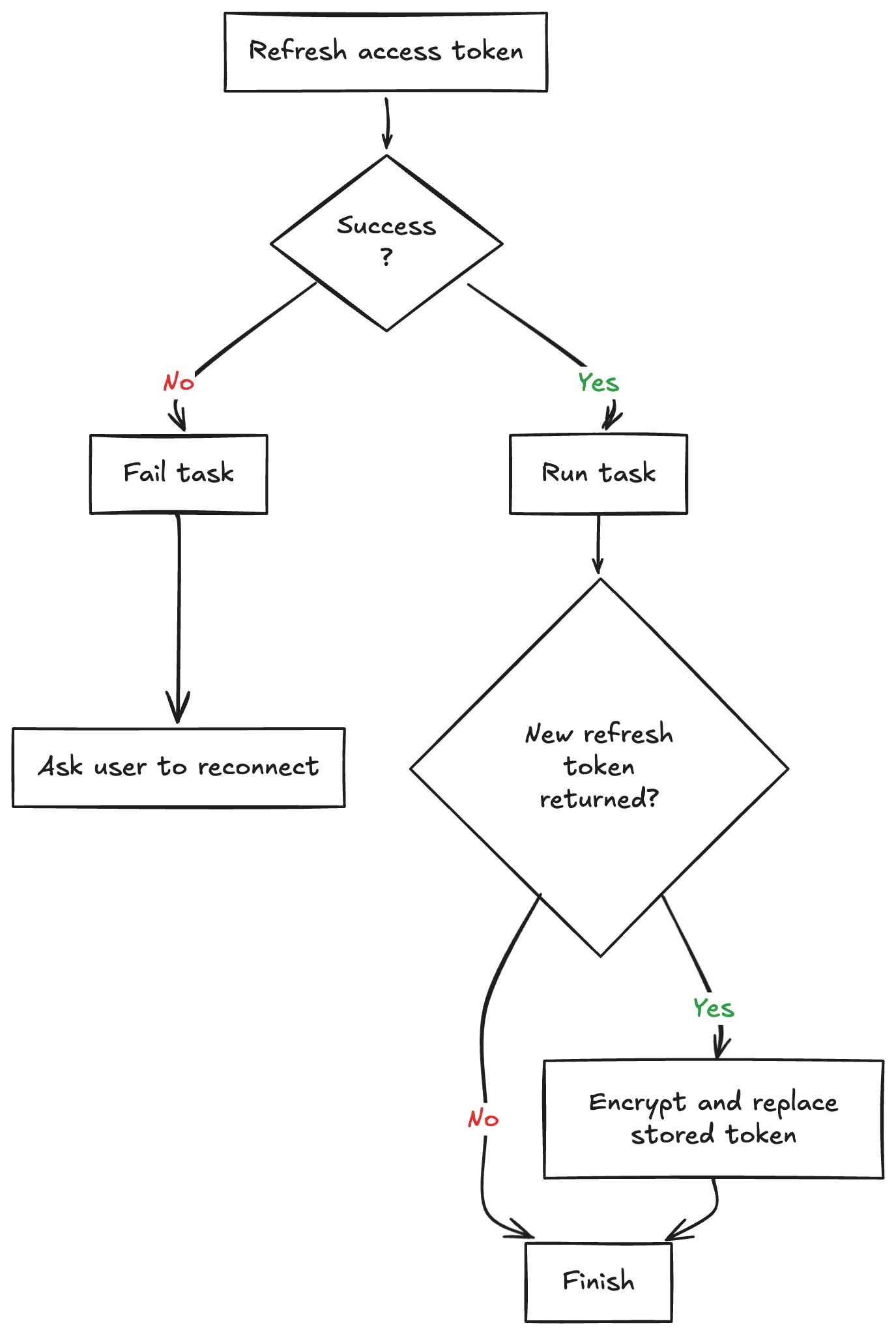
Diagram 3 - Failure and Rotation Handling
Step 1 - User Authentication
User logs in via OAuth provider.
You receive:
- access_token
- refresh_token
Step 2 - Scope the Permissions
Do not store full access.
Instead:
-
Request minimal scopes
-
Example:
- read:leads
- send:message
This reduces blast radius if compromised.
Step 3 - Encrypt and Store Refresh Token
const encrypted = encrypt(refreshToken, dataKey);

db.save({
  userId,
  encryptedRefreshToken: encrypted,
  scopes,
});
Step 4 - Schedule Task
Store:
- task payload
- userId reference
- execution time
Do NOT store access tokens.
Step 5 - Task Execution (Critical Step)
When the job runs:
1. Retrieve encrypted token
const encrypted = db.get(userId);
2. Decrypt
const refreshToken = decrypt(encrypted);
3. Request new access token
const accessToken = oauth.refresh(refreshToken);
4. Execute task
runTask(accessToken);
5. Discard secrets
- Remove tokens from memory
- Do not log them
Step 6 - Handle Token Rotation
Some providers rotate refresh tokens.
Always:
- Replace stored token with new one
- Re-encrypt before saving
Additional Hardening Strategies
1. Token Scoping per Feature
Instead of one global token:
-
Issue tokens per capability
-
Example:
- filterLeads token
- sendMessage token
Limits damage surface.
2. Task Limits
Prevent abuse:
- Max tasks per user
- Minimum execution frequency
Example:
- No more than 10 tasks
- No hourly execution
3. Audit Logging
Track:
- Token usage
- Task execution
- Failures
4. Retry + Expiry Handling
Handle:
- Expired refresh tokens
- Revoked access
Fallback:
- Mark task as failed
- Notify user to reconnect account
Real-World Pitfalls You Will Hit
1. Silent failures
Missing error handling will make tasks "just stop working"
2. Token expiration edge cases
Providers behave differently:
- Some invalidate old refresh tokens
- Some allow reuse
3. Background job scaling
Running thousands of tasks requires:
- Queue system (BullMQ, RabbitMQ)
- Worker isolation
Why This Design Works for AI Agents
This architecture enables:
- Autonomous execution
- Reliable scheduling
- Secure delegation of user actions
It is the foundation behind:
- AI CRMs
- Outreach automation
- Personal AI assistants
- Workflow orchestration systems
Final Takeaways
If you are building AI agents that act on behalf of users:
- Never rely on access tokens for delayed execution
- Always use refresh tokens
- Always encrypt tokens at the application level
- Always scope permissions
- Always design for rotation and failure
If You Are Building This Right Now
Start with:
- OAuth flow with refresh tokens
- Application-level encryption
- Background job system
- Token refresh at execution time
Then iterate toward:
- Scoped tokens
- KMS integration
- Observability
Summary
Secure authentication for AI agents running scheduled tasks comes down to one principle: design for execution time, not login time.
If a task runs hours or days later, an access token from the original session is already the wrong primitive. The reliable production approach is to store a refresh token securely, encrypt it at the application layer, refresh credentials only when the job executes, and handle rotation and failure as part of the system design.
That gives you what real autonomous agents need:
- delayed execution that still works
- minimal permission scope
- secure token storage
- resilience against expiry, revocation, and provider quirks
Without this architecture, scheduled AI actions are fragile. With it, they become safe enough to power real products like CRM automations, outreach systems, and workflow agents.
If you liked this article, consider reading my previous AI-related article:
Beyond the Chatbot: How to Build Software Using AI Agents and Skills in 2026?
Until next time and happy coding! 🧑💻