AI Agent UI Widgets - Why I Chose a Custom Implementation Over CopilotKit, AI SDK, LangChain, and Google A2UI

AI Agent UI Widgets in 2026 - Why I Chose a Custom Implementation Over CopilotKit, AI SDK, LangChain
If you are building AI agents today, you will eventually hit this problem:
Plain text responses are not enough.
You need UI.
Not just markdown. Not just chat bubbles.
You need:
- User cards
- Lists
- Action panels
- Structured outputs that feel like a real product
This article breaks down:
- The actual problem behind AI UI widgets
- The popular solutions (CopilotKit, AI SDK, LangChain, Google A2UI)
- Why I rejected all of them
- The custom architecture I ended up shipping in production
The Real Problem - AI Needs UI, Not Just Text
Most teams start with this:
User -> Prompt -> LLM -> Text response
Looks fine in demos. Falls apart in real products.
Example
Instead of:
"Here are your leads: John, Sarah, Mike"
You actually need:
- A list of leads
- Each with actions (message, call, view profile)
- Possibly enriched with metadata
So the real requirement becomes:
Render structured UI components driven by the LLM
This is not a chat problem anymore. This is a UI rendering problem with AI as the input layer.

The Goal
Let the AI agent decide what to render, not just what to say
That means:
- AI outputs structured data
- UI renders components dynamically
- System stays stable and predictable
Options I Evaluated
I looked at:
- CopilotKit
- Vercel AI SDK
- LangChain
- Google A2UI
The main issue behind all of them was the same:
- I wanted to avoid early vendor lock-in while there is still no clear major player in this space
- The abstractions for AI-driven UI are still changing and may look very different over time
- There are still not enough companies using these SDKs in production
- There is a lack of strong case studies showing long-term success with these approaches
- Reviewing open source implementations based on structured outputs and tool calling felt more valuable than committing early to a specific SDK
The Core Problem With All SDKs
Every solution introduces some level of:
- Lock-in
- Hidden abstraction
- Assumptions about how UI should work
And here is the reality:
We do not yet know what the "correct" abstraction for AI UI is
This space is still forming.
Choosing an SDK today is a bet on:
- Vendor direction
- API stability
- Community adoption
That is a risky bet in 2026.
Why I Chose Custom Implementation
I optimized for:
- Flexibility
- Long-term stability
- Control over UX
- Ability to evolve with the ecosystem
Instead of:
- Convenience
- Prebuilt abstractions
The Architecture I Built
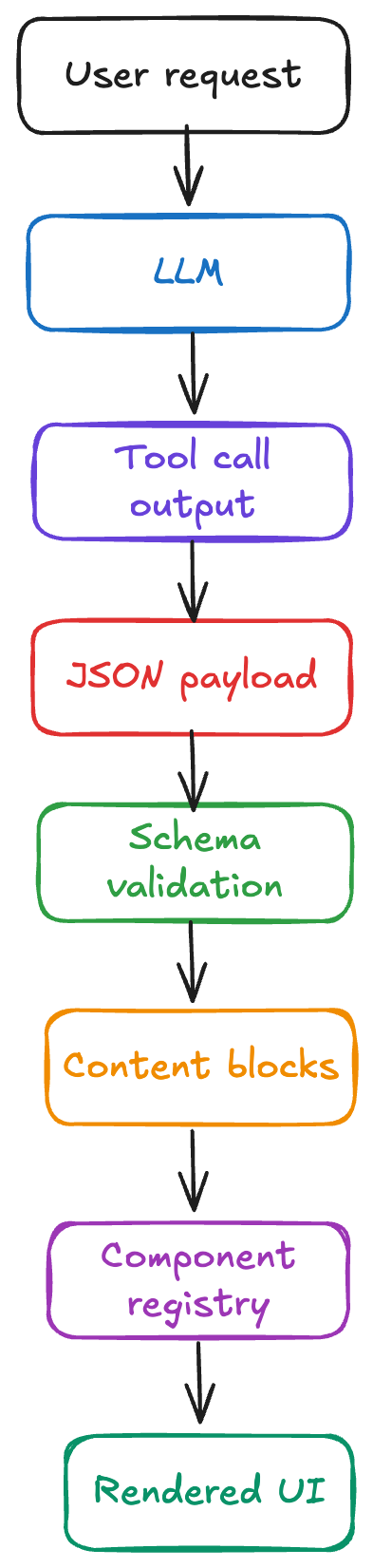
1. Tool Calling Defines UI
The agent does not return UI directly.
It returns structured tool output:
{
  "type": "user_list",
  "users": [
    { "id": 1, "name": "John Doe" },
    { "id": 2, "name": "Sarah Smith" }
  ]
}
This is generated via tool calling.
2. Content Blocks
Every AI response is normalized into:
type ContentBlock =
  | { type: "text"; content: string }
  | { type: "component"; component: ComponentDefinition };
3. UI Switch Renderer
On the frontend:
switch (block.type) {
  case "text":
    return <ChatMessage text={block.content} />;
  case "component":
    return renderComponent(block.component);
}
4. Component Registry
const registry = {
  user_list: UserList,
  user_card: UserCard,
};
5. Strict Schemas (Critical)
I enforce schemas using tools (Pydantic / Zod).
Why?
Because:
If the AI output is not predictable, your UI will break
Why This Approach Works
1. Zero Vendor Lock-In
I do not have to build my infrastructure and architecture around a vendor that may lower the priority of maintaining the solution later.
That risk matters even more in this space because many of these products still do not have enough real production users.
If the vendor changes direction in a way that is far from actual market expectations, I am not forced to rewrite core parts of my system around their roadmap.
2. Stable Contracts
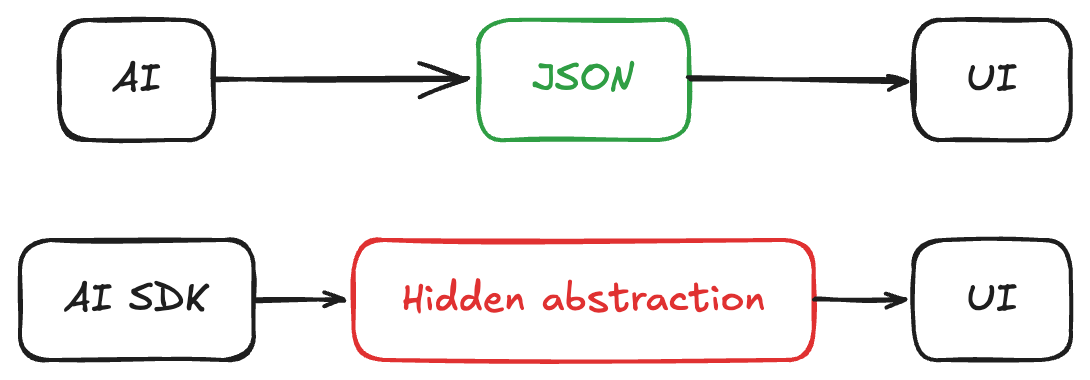
The contract is explicit:
AI -> JSON -> UI
Not:
AI SDK -> Magic -> UI
I know exactly how the solution works because there is no hidden layer translating things behind the scenes.
That makes the system easier to reason about, debug, and evolve.
It also gives me the flexibility to add the functionality my business logic actually requires without hitting the limits of a faulty abstraction.
That matters a lot while the UI widgets concept is still very early and the "right" abstraction is not settled yet.
3. Production Reliability
SDKs evolve fast.
That means:
- Breaking changes
- Deprecated APIs
- Rewrites
With custom:
I control the surface area
4. Easier Debugging
When something breaks:
- I inspect JSON
- I inspect schema validation
No black boxes.
5. Future-Proofing
This space will change.
A lot.
Likely outcomes:
- New standards emerge
- Current SDKs pivot or die
- UI patterns evolve rapidly
Custom approach lets me adapt.
What About Speed of Development?
For a new project, this is usually slower upfront.
But that was not my situation.
I was adding this to an existing project that already had its transport layer built around WebSockets.
Most SDKs in this space assume SSE as the default transport.
That means adopting them would not actually save me time. I would still need to adapt my architecture around their assumptions or build compatibility layers on top of what I already had.
So in my case, the custom implementation was not only better for architecture, it was also faster.
It fit the system that already existed instead of forcing me to reshape working infrastructure just to match an SDK.
For a serious product, this trade-off is worth it.

What I Learned Building This
Tool calling is enough
You do not need a full framework.
You need:
- Good schemas
- Good validation
- Clean rendering layer
When You Should NOT Do This
Use SDKs if:
- You are prototyping
- You are validating an idea
- You do not need long-term flexibility
Final Take
AI UI widgets are still an unsolved problem.
Right now:
- No dominant framework
- No stable abstraction
- No proven best practice
So my strategy is simple:
Do not lock in early.
Build:
- Simple
- Transparent
- Replaceable systems
Let the ecosystem mature before committing.
If You Are Building AI UI Today
Start here:
- Use tool calling
- Define strict schemas
- Render UI via component registry
- Keep your system modular
Everything else is optional.
Summary
Building AI UI widgets with a custom implementation gave me the control I needed at a stage where the space is still immature and the abstractions are not stable yet.
Instead of optimizing for short-term SDK convenience, I optimized for:
- Zero vendor lock-in
- Stable and explicit contracts
- Flexibility for business-specific logic
- Reliability in production
- Faster integration with my existing WebSocket-based architecture
For me, that tradeoff was worth it.
If the ecosystem matures and stronger standards emerge, I can adapt later without having to unwind a framework-shaped foundation.
If you liked this article, you might also enjoy my previous AI-related post:
Case Study: Secure Authentication for AI Agents Running Scheduled Tasks
Until next time and happy coding! 🧑💻